Category Archives: IT

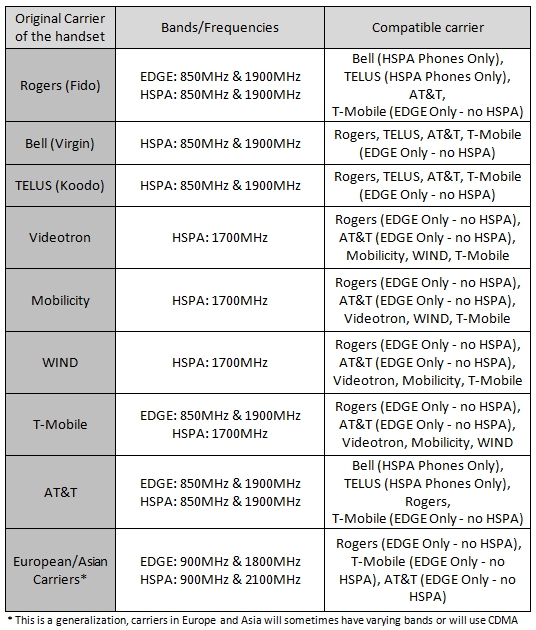
Canada Phone provider network band frequence


chart


LTE

Bell/Telus :  LTE AWS (1700 MHz) or LTE 700 MHz bands, or UMTS/HSPA compatible on 850/1900 MHz bands.


Device:

Ipad mini Cell:

  • UMTS/HSPA/HSPA+/DC-HSDPA (850, 900, 1700/2100, 1900, 2100 MHz); GSM/EDGE (850, 900, 1800, 1900 MHz)
  • CDMA EV-DO Rev. A and Rev. B (800, 1900 MHz)
  • LTE (Bands 1, 2, 3, 4, 5, 7, 8, 13, 17, 18, 19, 20, 25, 26)3

Sumsung:

  • Network compatibility
    LTE
  • Maximum download speed
    Up to 75 Mbps
  • LTE compatibility
    Yes
  • HSPA/UMTS compatibility
    850/1900/2100 MHz
  • GPRS/EDGE compatibility
    850/900/1800/1900 MHz

1. Telus (Koodo)
2G
CDMA 850/1900
EVDO 850/1900

3G (and fake 4G)
HSDPA 850/1900
HSPA+ 850/1900
UMTS 850/1900
WCDMA 850/1900
1x EV-DO CDMA2000

4G (called 4G+)
LTE 1700/2100
——————————————————————–
2. Bell (Virgin Mobile, PC Mobility)

2G
CDMA 850/1900
EVDO 850/1900

3G (and fake 4G)
HSDPA 850/1900
HSPA+ 850/1900
UMTS 850/1900
WCDMA 850/1900
1x EV-DO CDMA2000

4G
LTE 1700
—————————————————————————
3. Rogers (Fido, Petro-Canada Mobility)

2G
GSM 850/1900
GPRS 850/1900
EDGE 850/1900

3G (and fake 4G)
HSDPA 850/1900
HSPA+ 850/1900
UMTS 850/1900
WCDMA 850/1900

4G
LTE 1700

TRACE for win32

// TRACE macro for win32
#ifndef __TRACE_H__850CE873
#define __TRACE_H__850CE873

#include <crtdbg.h>
#include <stdarg.h>
#include <stdio.h>
#include <string.h>

#ifdef _DEBUG
#define TRACEMAXSTRING	1024

char szBuffer[TRACEMAXSTRING];
inline void TRACE(const char* format,...)
{
	va_list args;
	va_start(args,format);
	int nBuf;
	nBuf = _vsnprintf(szBuffer,
				   TRACEMAXSTRING,
				   format,
				   args);
	va_end(args);

	_RPT0(_CRT_WARN,szBuffer);
}
#define TRACEF _snprintf(szBuffer,TRACEMAXSTRING,"%s(%d): ", \
				&strrchr(__FILE__,'\\')[1],__LINE__); \
				_RPT0(_CRT_WARN,szBuffer); \
				TRACE
#else
// Remove for release mode
#define TRACE  ((void)0)
#define TRACEF ((void)0)
#endif

#endif // __TRACE_H__850CE873

study note ideas

Pages online are good to read.  when we want to use it, learn it, study it, note it, it’s diffcult to use it as if I own the page as my book.  where i can

put highlight

comment

or even draw something

and it need to be private my version , so it’s easier to read next time for me.


List system Normal user account ONLY

PNET_DISPLAY_USER pBuff, p;
DWORD res, dwRec, i = 0;

do // begin do
{
//
// Call the NetQueryDisplayInformation function;
// specify information level 3 (group account information).
//
res = NetQueryDisplayInformation(NULL, 1, i, 100, MAX_PREFERRED_LENGTH, &dwRec,(PVOID *) &pBuff);
//
// If the call succeeds,
//
if((res==ERROR_SUCCESS) || (res==ERROR_MORE_DATA))
{
p = pBuff;
for(;dwRec>0;dwRec–)
{
//
// Print the retrieved group information.
//
CW2A name( p->usri1_name );
bool bNormalAccount=false;

if(p->usri1_flags & UF_NORMAL_ACCOUNT&& !(p->usri1_flags & UF_ACCOUNTDISABLE)&& !(p->usri1_flags & UF_PASSWD_NOTREQD))
{
bNormalAccount=true;
TRACE(“Normal account %s\n”,name.m_szBuffer);
}

//
i = p->usri1_next_index;
p++;
}
//
// Free the allocated memory.
//
NetApiBufferFree(pBuff);
}
else
printf(“Error: %u\n”, res);
//
// Continue while there is more data.
//
} while (res==ERROR_MORE_DATA); // end do

TCP window scaling (Windows)

Tcp1323Opts

Tcp1323Opts

HKLM\SYSTEM\CurrentControlSet\Services\Tcpip\Parameters


http://technet.microsoft.com/en-us/library/cc757402(v=ws.10).aspx


Windows 2003

http://support.microsoft.com/default.aspx?scid=kb;en-us;912222

Data type Range Default value
REG_DWORD 0 | 1 | 2 | 3 3

Description

Specifies whether TCP uses the timestamping and window scaling features described in RFC 1323, TCP Extensions for High Performance.

Window scaling permits TCP to negotiate a scaling factor for the TCP receive window size, allowing for a very large TCP receive window of up to 1 GB. The TCP receive window is the amount of data that the sending host can send at one time on a connection.

Timestamps help TCP measure round trip time (RTT) accurately in order to adjust retransmission timeouts. The Timestamps option provides two timestamp fields of 4 bytes each in the TCP header, one to record the time the initial transmission is sent and one to record the time on the remote host.

This entry is a 2-bit bitmask. The lower bit determines whether scaling is enabled; the higher bit determines whether timestamps are enabled. To enable a feature, set the bit representing the feature to 1. To disable a feature, set its bit to 0.

Value Meaning
0 (00) Timestamps and window scaling are disabled.
1 (01) Window scaling is enabled.
2 (10) Timestamps are enabled.
3 (11) Timestamps and window scaling are enabled.